

Desktop CNC vs Robotics
Side-by-side on feel, cost, and what your week needs to look like, so you can pick Desktop CNC or Robotics with your real life in mind, not just the aesthetic.
Desktop CNC and Robotics can feel similar on paper, but they ask for different weeks: Desktop CNC suits $300+, Robotics suits $50–$300. The clearest personality split is social: Solo for Desktop CNC, Optional group for Robotics.
Desktop CNC
Design parts in CAD and machine them for real on a desktop CNC router.
Design parts in CAD and watch a desktop machine carve them from wood, plastic, or metal.
Robotics
Build a machine and write the code that makes it move on its own.
Build a machine and write the code that makes it move on its own.
Which is right for you?
Choose Desktop CNC if…
- Make precise, repeatable parts a hand tool simply can't achieve.
- Bridges design and the physical world, so you draw it, then hold it.
- Endlessly useful: signs, parts, inlays, prototypes, and more.
Choose Robotics if…
- Watching your machine finally move on its own is hard to beat.
- You like switching between soldering, mechanics, and chasing code bugs.
- You'll debug a twitching motor for hours to get it right.
Experience profile75% overlap
Still
Still
Deep focus
Intense
Solo
Optional group
Structured
Structured
Hours
Days
Some expression
Open-ended
Depth & mastery
Desktop CNC
Progression · Gradual mastery
Robotics
Progression · Lifelong craft
Practical fit
Shaded rows show where they differ.
Activity type
Sensory & flags
Shared
Desktop CNC only
Before you commit
Desktop CNC
- A real learning curve across CAD, CAM, and machine setup.
- The machine and tooling are a meaningful upfront cost.
- Dust, noise, and chips need a dedicated, managed space.
Robotics
- Wiring shorts and code errors before anything works would defeat you.
- Broken parts and rising budgets would stall you fast.
- You want linear progress, not a long stretch of nothing moving.
Starter gear
What you'll need
Essential kit only, what you actually buy on day one.

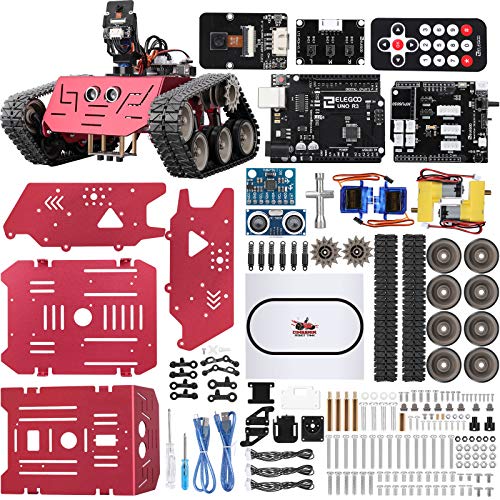

Amazon affiliate links, we earn a small commission at no extra cost to you.
Common questions
Should I pick Desktop CNC or Robotics?
How different are Desktop CNC and Robotics?
Which is easier for beginners: Desktop CNC or Robotics?
Which costs more to start: Desktop CNC or Robotics?
Next steps
Still undecided?
Take the quiz: we'll match you to the right hobby, solo or with friends.