Best Cricut Machine for Beginners (2026): Joy Xtra vs Explore 3 vs Maker 3
The cutting machine is the whole hobby, and Cricut makes three that suit beginners at very different budgets. The real question is how much material variety you want to cut: the compact Joy Xtra for cards and vinyl, the Explore 3 for the classic all-rounder, or the Maker 3 if you want to cut everything up to leather and wood. Here is how they compare.
HobbyStack may earn a commission from links on this page at no extra cost to you. Our picks are chosen on merit; the commission helps fund the research.
- Pick by what you want to cut: Joy Xtra for cards, labels, and vinyl; Explore 3 for the popular all-rounder; Maker 3 to also cut thick materials like leather and basswood.
- The Explore 3 and Maker 3 use Smart Materials, so they cut long designs without a sticky mat. The Joy Xtra is more compact and casual.
- The machine is the start of the cost: budget for materials (vinyl, cardstock), and a heat press or EasyPress for iron-on projects.
- All three are beginner-friendly through the free Design Space app, so pick on capability and budget, not difficulty.
 Cricut Joy XtraCasual cards, labels, and decals$179Check price
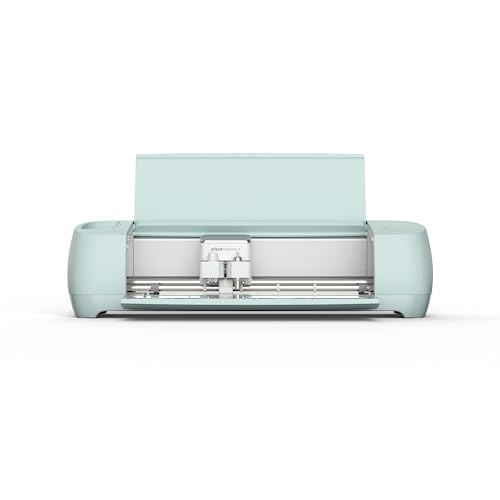 Our pickCricut Explore 3The all-rounder most beginners want$268Check price
 Cricut Maker 3Cutting thick materials too$320Check price
Every Cricut decision comes down to one question: what do you want to cut? All three machines here are genuinely beginner-friendly and run off the same free Design Space app, so the difference is not difficulty, it is range. The Joy Xtra is compact and casual, great for cards, labels, and vinyl decals. The Explore 3 is the classic all-rounder that handles the vast majority of popular projects (vinyl, iron-on, cardstock). The Maker 3 adds serious cutting force and extra tools, so it also cuts thick and tricky materials like leather, felt, and thin basswood.
Two practical things shape the choice. First, Smart Materials: the Explore 3 and Maker 3 can feed long rolls of material without a sticky cutting mat, which is faster and less fiddly for big projects, while the Joy Xtra is built for smaller, quicker jobs. Second, the machine is only the start of the spend. You will buy materials (vinyl, cardstock, iron-on), and if you want to make T-shirts and tote bags, a heat press or Cricut EasyPress is the add-on that makes iron-on projects last.
 Best budget Cricut
Cricut Joy Xtra
The easiest, cheapest way into Cricut. The Joy Xtra is compact and simple, and it handles the projects most beginners actually start with: greeting cards, labels, stickers, and vinyl decals. It cuts bigger designs than the original tiny Joy while staying affordable and desk-friendly. If you are curious and want to try the hobby without a big outlay, start here.
What's good
- Very affordable entry to Cricut
- Compact, easy to store and set up
- Great for cards, labels, and vinyl
- Same beginner-friendly Design Space app
What's not
- Limited material range vs Explore and Maker
- Smaller cutting size, less for big projects
 Best for most beginners
Cricut Explore 3
The Cricut most beginners should buy. The Explore 3 cuts the huge majority of popular projects (vinyl, iron-on, cardstock, and more) and supports Smart Materials, so it can cut long designs without a sticky mat. It is faster and more capable than the Joy Xtra while staying easy to learn, and it is the sweet spot of price and range for someone who wants to actually grow into the hobby.
What's good
- Cuts the most popular materials with ease
- Smart Materials: long cuts without a mat
- Fast and beginner-friendly
- The classic all-rounder
What's not
- Will not cut thick materials like the Maker
- A heat press is a separate buy for iron-on
 Best to grow into
Cricut Maker 3
The do-everything machine. The Maker 3 has far more cutting force and works with extra tools, so on top of vinyl and iron-on it cuts thick and tricky materials like leather, felt, chipboard, and thin basswood. It also uses Smart Materials for fast matless cuts. It is more than a casual crafter needs, but if you already know you want to sew, model, or work with tougher materials, it is the one you will not outgrow.
What's good
- Cuts hundreds of materials, including thick ones
- High cutting force plus extra tool support
- Smart Materials for fast matless cuts
- The most future-proof beginner Cricut
What's not
- Premium price
- Overkill if you only cut vinyl and cardstock
The machine is the start of the spend, not the end. You will buy materials (vinyl, cardstock, iron-on), and if you want to make T-shirts, tote bags, or anything with iron-on, a heat press or Cricut EasyPress is the add-on that makes those projects actually last. Factor it in so your first project is not held up waiting for supplies.
Which to buy: just want to try cards, labels, and vinyl without spending much? The Joy Xtra. Want the popular all-rounder that handles almost every beginner project and grows with you? The Explore 3 is the pick for most people. Know you want to cut leather, wood, or sew, and want to buy once? The Maker 3.
Before you buy
Choose by materials, not by fear: all three are beginner-friendly, so pick the one whose cutting range matches your projects.
Get a starter batch of materials (vinyl, cardstock, iron-on) with the machine so you can start on day one.
For iron-on projects (shirts, bags), add a Cricut EasyPress or heat press. A household iron is unreliable for this.
Watch a couple of Design Space beginner tutorials first. The learning curve is the software, not the machine.
Cricut machine questions
Which Cricut is best for a beginner?
What is the difference between the Explore 3 and the Maker 3?
What are Smart Materials?
Do I need a heat press for a Cricut?
Is a Cricut hard to learn?
What else do I need to buy to start?
For most beginners the Cricut Explore 3 is the pick: it cuts almost every popular project, uses matless Smart Materials, and is easy to learn without overspending. Just want cards and vinyl for less? The Joy Xtra. Want to cut leather, wood, and everything else and buy once? The Maker 3. Whichever you choose, budget for materials and a heat press for iron-on projects.
Ready to actually do it?
The first cricut & vinyl crafting quest takes an evening, and it tells you whether the gear was worth it better than any review can.
Start Cricut & Vinyl CraftingThe HobbyStack editorial team researches each guide against manufacturer specifications, published resources and practitioner sources. Every product is checked for availability and described against its current listing before publication, and prices are re-checked when guides are updated.
About our editorial process →More gear guides
All guides
Best Cricut Mats and Tools (2026): The Grip Grade Is the Decision
Mats come in grip grades, and matching the grade to the material is most of whether a cut works. Too little grip and the material shifts mid-cut and everything after that point is wrong. Too much and delicate paper tears when you try to get it off, which is why a strong mat is the worst possible choice for cardstock.

Best Epoxy Resin for Beginners (2026): 3 Honest Picks
Here is the honest truth most resin guides skip: the resin you buy matters less than how you use it. A cheap starter kit, mixed properly and left to cure in a warm, dust-free spot, will make a coaster you are proud of. The two things that actually make or break your first pour are not the brand, they are technique (measure carefully, mix thoroughly, then release the bubbles with a bit of heat) and safety (gloves on, window open, every single time). So this is not a guide that tells you to spend big to get started. It is a guide to picking a resin that fits what you want to make. All three picks here are two-part epoxy that cures clear and glossy, and all handle the beginner projects people actually start with: coasters, keychains, jewelry, and coating small pieces of art. The ladder is simple: a cheap kit to learn on, a trusted low-bubble art resin that resists yellowing, or a deep-pour resin for thick castings and embedding. Here are three good ones, and honest advice on when the cheap one is plenty.

Best Macrame Cord (2026): Single Strand Combs Out, Three-Ply Does Not
Cord comes in three constructions and they behave completely differently at the one moment that matters most: whether you can comb the ends out into soft fringe. Single strand combs beautifully. Three-ply gives you a crinkled, curly fringe instead. Braided will not comb at all. Buy the wrong one for your project and the finish is decided for you.

Best Macrame Kit for Beginners (2026): 3 Picks for Your First Knots
A macrame kit gives you the cord, the rings and dowels, and (crucially) a guide, so you can knot your first plant hanger or wall hanging without buying anything separately. The cord is the heart of it: soft 3mm cotton is the beginner standard. Here are three good ones, from a single-project starter to a big multi-project kit with a project book.
Best Lathe for Pen Turning 2026: WEN vs Rikon 70-105 vs JET Mini Lathes
The lathe is the heart of pen turning, and the first decision is how much to buy. Two specs decide it, electronic variable speed and weight, and they separate a lathe you'll love from one you'll fight. Here are three honest picks, from a best-selling budget mini to a cast-iron value benchmark to JET's buy-once midi.

Best Pen Turning Chisels (2026): You Will Use Four of the Eight
An eight-piece lathe chisel set is sold as a starter kit, and a pen turner will use about four of them. Pens are small-diameter spindle work, so the roughing gouge, the spindle gouge, the skew and the parting tool do nearly everything, and the bowl gouge stays in the box.