Best Drawing Tablet for Beginners 2026: XP-Pen Deco vs Wacom Intuos vs Huion Kamvas
Your first drawing tablet is where digital art begins, and the first decision is the big one: a screenless pen tablet (cheaper, lighter, what most pros use) or a pen display you draw directly on (instantly natural, but two to four times the price). The honest answer for almost everyone is start screenless. Here are three picks and which one fits where you are.
HobbyStack may earn a commission from links on this page at no extra cost to you. Our picks are chosen on merit; the commission helps fund the research.
- For most beginners, the Wacom Intuos Small (~$97) is the pick — a screenless pen tablet from the brand whose drivers and reliability set the standard. It just works, which is exactly what you want while you're learning.
- On a budget, the XP-Pen Deco 01 V3 (~$48) gives you a bigger 10×6-inch drawing area and the same pressure sensitivity for about half the price — the value pick, a notch below Wacom on drivers but excellent for a beginner.
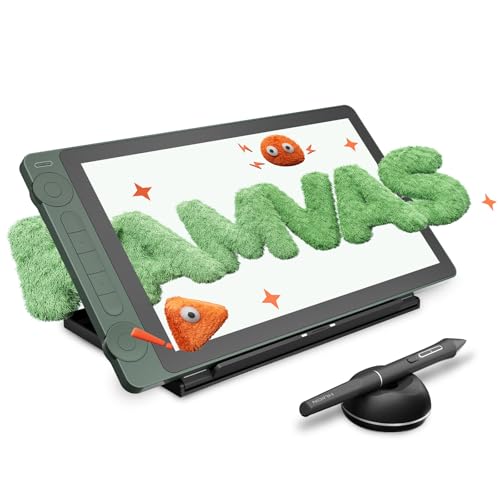
- For the on-screen experience, the Huion Kamvas 13 (~$208) is a pen display — you draw directly on a 13-inch laminated screen, the paper-like feel worth upgrading to once you're sure you're in this.
- Pen tablet vs pen display is the whole decision. A screenless tablet (you look at your monitor) is cheaper, lighter, lasts longer, and is what most pros use — start here. A pen display (you draw on the screen) feels instantly natural but costs two to four times as much.
- Skip: an iPad as your first tablet (expensive, and a separate ecosystem — learn on a cheap pen tablet first); an oversized tablet (small or medium matches your monitor and saves desk space); and no-name tablets with flaky drivers.


Pen tablet vs pen display — the choice that decides everything else
Every drawing tablet is one of two kinds, and for a beginner this is the whole decision.
A pen tablet is screenless: you draw on a flat surface on your desk while watching the line appear on your monitor. It sounds awkward, and for about a week it is — your hand is in one place and your eyes are in another. Then your brain rewires and you stop noticing. Screenless tablets are cheaper, lighter, run cooler, and last for years, and the majority of professional concept artists and illustrators use them by choice even after a decade. For almost every beginner, this is where to start.
A pen display has a screen: you draw directly on a lit panel, so the pen tip and the line are in the same place — immediately familiar, especially if you've drawn on paper or an iPad. The catch is cost (two to four times a pen tablet), plus weight, heat, and the fact that it still has to plug into a computer. It's a genuine upgrade, not a starting point.
The honest advice almost every artist gives: start screenless. The adjustment is real but brief, and the $100–$200 you save is better spent on software or, frankly, practice. Move to a display when you know you're serious — not to get going.
 Best for most beginners
Wacom Intuos Small Pen Tablet
The safe answer for almost anyone. The Wacom Intuos is the most-recommended beginner tablet for one boring, important reason: it just works. Wacom has made these longer than anyone, and it shows in the drivers — they install cleanly, the pen never lags, and there's no troubleshooting rabbit hole eating the time you meant to spend drawing. The pen is battery-free and pressure-sensitive, the compact working area is plenty for a beginner and easy to fit on a desk, and the build outlasts several cheaper tablets. It's not the biggest or the cheapest here, but it's the one you can buy without a second thought.
What's good
- Wacom's drivers — clean, reliable, no troubleshooting
- Battery-free pressure pen that just works
- Compact — fits any desk, easy to travel with
- Built to last; the trusted standard
What's not
- Smaller drawing area than the cheaper XP-Pen
- About twice the XP-Pen's price for less surface
- Screenless — the brief hand-eye adjustment applies
 Best value
XP-Pen Deco 01 V3 Drawing Tablet
More tablet for less money. The XP-Pen Deco 01 V3 gives you a generous 10-by-6-inch drawing area and the same high pressure sensitivity as tablets costing far more — for around half the price of the Wacom. XP-Pen has become the go-to value brand for exactly this reason: a big, responsive, battery-free-pen tablet for beginner money. The honest trade is that the drivers and long-term build are a notch below Wacom's, and the occasional driver update can be fussier — but for someone starting out, the value is genuinely hard to beat, and the larger surface is nicer to draw on.
What's good
- Big 10×6-inch drawing area — more room to draw
- Same high pressure sensitivity as pricier tablets
- Around half the price of the Wacom
- Battery-free pen; great value all round
What's not
- Drivers a notch below Wacom's — occasional fuss
- Build quality not quite Wacom-durable
- Screenless — the brief hand-eye adjustment applies
 The on-screen upgrade
Huion Kamvas 13 Pen Display
For when you want to draw *on* the picture. The Huion Kamvas 13 is a pen display — a 13-inch laminated screen you draw directly onto, so the pen tip and the line sit in the same place, just like paper or an iPad. That immediacy is the whole appeal, and Huion has become the value leader in displays: you get a laminated screen (no distracting gap between glass and pixels), high pressure sensitivity, and a genuinely good drawing feel for a fraction of what Wacom's displays cost. It's the upgrade to make once you're sure you're serious — just know it's heavier, runs warm, and still needs to connect to a computer.
What's good
- Draw directly on the 13-inch screen — paper-like feel
- Laminated screen — no gap between pen and line
- Far cheaper than Wacom's pen displays
- The natural next step up from a pen tablet
What's not
- Two to four times the price of a pen tablet
- Heavier, runs warm, needs a computer connection
- Overkill as a *first* tablet — start screenless
The number-one thing that scares beginners off a screenless pen tablet is the disconnect — your hand draws on the desk while the line appears on the monitor. It feels strange for about a week, and then your brain rewires and you stop noticing. Don't let that brief adjustment push you into spending two to four times as much on a pen display before you're sure you need one. The artists who draw best aren't the ones with the fanciest hardware — they're the ones who put in the hours. A cheap pen tablet plus practice beats an expensive display gathering dust.
How to choose between the three
Pick the Wacom Intuos if you want the no-drama option — clean drivers, a reliable pen, and a tablet you can buy without a week of research. It's the right call for most beginners, and the compact size keeps your desk clear.
Pick the XP-Pen Deco 01 V3 if you want the most tablet for the least money — a bigger drawing area and the same pressure feel for about half the price. The value pick, with a minor trade in driver polish.
Pick the Huion Kamvas 13 if you already know you want to draw on the screen and you're past the 'just trying it' stage. It's a genuine, affordable pen display — the natural upgrade from a pen tablet.
If you're unsure, get the Wacom Intuos (or the XP-Pen if money's tight): start screenless, and move to a display later if and when you want one.
Before you buy
Start screenless. A pen tablet is cheaper, lighter, lasts longer, and is what most pros use — the brief hand-eye adjustment is worth the savings. Buy a display later if you want one.
Small or medium is plenty. Match the tablet's proportions to your monitor; a huge tablet just eats desk space and makes you move your whole arm.
The pen should be battery-free. All three here use battery-free pressure pens (the modern standard) — avoid old tablets with charged or battery pens.
Budget for software — but it can be free. Krita is free and genuinely good; Clip Studio Paint is a cheap one-time license. You don't need a Photoshop subscription to start.
An iPad isn't the cheap way in. It's a great drawing device but a pricey first step and a separate ecosystem — a ~$50 pen tablet plus the computer you already own gets you drawing for far less.
Common questions about beginner drawing tablets
Pen tablet or pen display for a beginner?
Is a screenless tablet really hard to get used to?
Wacom, XP-Pen, or Huion — which brand?
What size drawing tablet should I get?
Do I need an iPad, or is Procreate better?
What software do I need with a drawing tablet?
For most beginners, the Wacom Intuos Small Pen Tablet is the buy — Wacom's reliability and clean drivers make it the no-drama pick. Tight budget? The XP-Pen Deco 01 V3 Drawing Tablet gives you a bigger drawing area for about half the price (~$48). Sure you want to draw on the screen? The Huion Kamvas 13 Pen Display is a genuine, affordable pen display — the upgrade once you're serious.
Ready to actually do it?
The first digital art quest takes an evening, and it tells you whether the gear was worth it better than any review can.
Start Digital ArtThe HobbyStack editorial team researches each guide using practitioner communities, published resources, and direct input from active hobbyists. Every guide is reviewed for accuracy before publication and updated when practices change.
About our editorial process →More gear guides
All guides
Best Monitor for Digital Art 2026: BenQ GW2790 vs Dell 4K USB-C vs BenQ SW272U
A color-accurate monitor is what lets you trust the colors you're choosing, but how much you need depends entirely on where your art ends up. Screen-based work needs accurate sRGB, which any good IPS monitor delivers; print work needs wide-gamut AdobeRGB and calibration, which is a different (and pricier) class of tool. Here are three picks across that divide.

Best Audio Interface for Beginners (2026): 3 Picks to Record Clean Audio
An audio interface is the box that turns your microphone or guitar into clean, professional-sounding audio your computer can record. It plugs in over USB and does two jobs a laptop cannot: it powers proper microphones and converts the sound with far less noise and latency than your built-in socket. For most beginners the honest truth is that the differences between the good ones are small, so you are really choosing how many inputs you need and how much you want to spend. Here are three that will not let you down, from a simple one-mic setup to a step-up with warmer, more characterful sound.

Best Beginner Acrylic Paint Set 2026: Liquitex BASICS and Where to Start
Acrylics are the best paint to start with: fast-drying, water-cleanup, and forgiving, but the cheapest craft-store paints are so thin and chalky they'll put you off. The fix is student-grade acrylics with real pigment, which cost barely more. Here are three sets, from the beginner standard to a pro-quality upgrade.

Best Canvas for Painting (2026): Cotton, Linen, and What Primed Really Means
Almost every cheap canvas says pre-primed, and almost every painter adds more primer anyway. Factory gesso is applied thinly to keep costs down, so paint sinks into the weave, colours dry dull and you use two or three times as much of an expensive tube as you needed to.

Best Easel for Beginners (2026): Tabletop, H-Frame or Neither
An easel is the piece of painting equipment people buy first and need last. Watercolour is usually painted flat or at a shallow angle; small acrylic and oil studies work fine propped against a stack of books. What an easel really buys you is the ability to stand back, see the whole picture at once, and work at a size your table cannot hold.

Best Graphite Pencils for Beginners (2026): 3 Picks
Graphite pencils come in a range of grades, from hard (H) that make light, thin lines to soft (B) that make dark, smudgy ones. For a beginner, the one spec that actually matters is getting a set that spans that range, roughly 2H to 8B, so you can shade properly instead of pressing harder on one pencil. Any of these three will do that.