Best Robotics Starter Kit (2026): Build It or Just Code It
Robotics kits split into two philosophies that suit very different people. One gives you loose components and a wiring diagram, so you learn electronics on the way to a working robot. The other gives you a finished robot and asks what you want it to do. Neither is better — but buying the wrong one is the most common way a kit ends up in a cupboard half-built.
HobbyStack may earn a commission from links on this page at no extra cost to you. Our picks are chosen on merit; the commission helps fund the research.
- Decide first: do you want to learn electronics, or to program something that already works?
- Arduino-based kits teach wiring, sensors and real code. They also arrive as a bag of parts.
- Pre-assembled robots start working in minutes and teach programming, not hardware.
- Check what is NOT included. Batteries are the classic omission, and some kits need a soldering iron.
- Community and documentation matter more than the parts list. A kit with good tutorials gets finished.
 Our pickELEGOO Smart Robot Car V4Learning electronics$80Check price
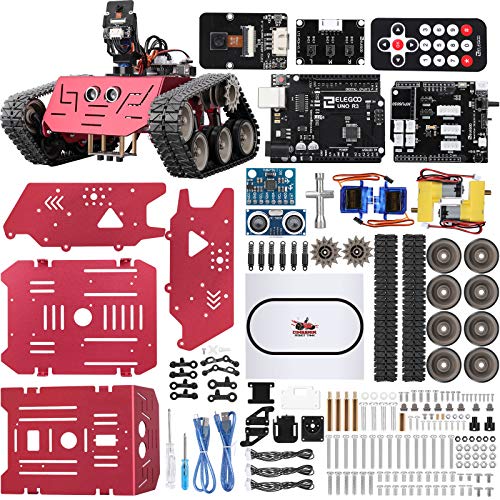 ELEGOO Conqueror Tank KitRough terrain and mechanics$91Check price
 Makeblock mBot2Coding straight away$160Check price
Two different hobbies wearing the same name
Component kits — the Arduino-based ones — arrive as a chassis, motors, a controller board, an assortment of sensors and a lot of jumper wires. You build the robot, wire the sensors, and write code that reads them. When something does not work, the fault could be in the code, the wiring, a loose connector or a flat battery, and finding out which is the actual education.
Pre-built robots arrive assembled and working. You connect and start programming, usually in a block language with an option to move to Python later. Nothing is ever wired wrongly because nothing is wired by you.
The first teaches electronics, debugging and patience. The second teaches programming and computational thinking, and gets a result on the first evening.
For a curious adult who wants to understand how it works, component. For a child, a classroom, or someone whose interest is the software, pre-built. Choosing by price rather than by that question is how kits end up abandoned.
What is not in the box
The single most common frustration with a first kit is discovering something essential is missing on the evening you sit down to build it.
Batteries. Many kits need 18650 lithium cells and a charger, and ship without them because of shipping restrictions. Check before ordering.
A computer and cable. Arduino kits need a USB connection, and some ship with a cable that is charge-only rather than data.
A soldering iron. Most beginner kits avoid soldering, but some sensors or motor connections need it. If the listing mentions soldering anywhere, budget for an iron.
Small tools. A precision screwdriver set, and often a pair of flush cutters for trimming zip ties and pins.
None of these is expensive. All of them stop a build dead if you find out at the wrong moment.
 Best for learning electronics
ELEGOO Smart Robot Car Kit V4.0
A self-assembly Arduino robot car, and the most-recommended first kit for good reasons: it costs little, the documentation is genuinely thorough, and the sensor set covers the classic beginner projects — line following, obstacle avoidance, remote control — so you have a sequence of achievable goals rather than one large one. Building it teaches wiring and connector discipline, and the included camera opens up a step beyond that. The honest caveats are that it arrives as a bag of parts and takes an evening to assemble, batteries are not included, and when something does not work you will be debugging hardware and software at once. That difficulty is the education, but go in expecting it.
What's good
- Thorough documentation and tutorials
- Sensor set covers several real projects
- Teaches wiring as well as code
- Cheapest genuine Arduino robot platform
What's not
- Arrives unassembled — expect an evening
- Batteries not included
- Debugging hardware and code together is hard at first
- Plastic chassis is not rugged
 Best for mechanics
ELEGOO Conqueror Robot Tank Kit
The same Arduino approach on a tracked chassis, and the tracks are the reason to choose it rather than a styling decision. Tracked drive behaves differently from wheels — it turns by driving the sides at different speeds, copes with carpet, gravel and small obstacles that stop a wheeled car, and gives you a genuinely different set of mechanical problems to solve. The build is more involved than the car, which is a benefit if the mechanical side is what interests you and a cost if it is not. Same good documentation. It is more expensive, still needs batteries, and if your interest is really the code rather than the machine, the pre-built robot is the better buy.
What's good
- Tracked drive handles real terrain
- More mechanically interesting build
- Same strong documentation
- Sturdier than the wheeled car
What's not
- Longer, more fiddly assembly
- Batteries still not included
- More expensive
- Wrong kit if you mainly want to code
 Best for coding straight away
Makeblock mBot2 Coding Robot Kit
A pre-assembled robot that works out of the box, and that is the entire proposition — you are programming within minutes rather than wiring for an evening. It starts in a Scratch-style block language and moves to Python when the blocks stop being enough, which is a genuinely well-judged progression for a young learner or anyone whose interest is software rather than hardware. Sensors and expansion parts are available if you want to extend it. What you do not get is any understanding of the electronics, because none of it is exposed to you, and it costs roughly three times the self-build car. Buy it for a child, a classroom, or if you know the wiring would be a barrier rather than the point.
What's good
- Working in minutes, no assembly
- Block coding with a real path to Python
- Excellent for children and classrooms
- Expandable with add-on sensors
What's not
- Teaches no electronics — nothing is wired by you
- Three times the price of the self-build car
- Closed ecosystem for parts
- Less to tinker with once you outgrow it
A great many robot kits need 18650 lithium cells and a charger, and ship without them because of shipping rules on batteries. Finding that out on the evening the kit arrives is the single most common way a first build stalls. Read the "what is included" list properly and order the cells at the same time.
Getting past the first wall
Almost everyone hits the same failure early: the robot is built, the code uploads, and nothing happens. A short diagnostic order saves hours.
Power first. Are the batteries charged and the switch on? Flat or half-charged cells cause behaviour that looks exactly like a code bug — motors that stutter or a board that resets.
Then connections. Jumper wires work loose, and one row off on a header is invisible unless you look for it. Reseat everything.
Then one component at a time. Upload a sketch that only drives one motor. Then one that only reads one sensor. Building up from working pieces is far faster than staring at the full program.
Then the code. By this point you have eliminated most of what it could be.
The hardware-first order matters, because software people instinctively assume the bug is in the software, and in robotics it usually is not.
Before you buy
Decide whether you want to learn electronics or programming. That picks the kit.
Check whether batteries and a charger are included. Usually they are not.
Look at the documentation and tutorials before the parts list.
If soldering is mentioned anywhere, budget for an iron.
Buying for a child? Pre-built gets a result on the first evening.
Robotics kit questions
Should I buy an Arduino kit or a pre-built robot?
Do robotics kits include batteries?
Do I need to know how to code first?
My robot does not work — where do I start?
Choose by what you want to learn, not by price. The ELEGOO Smart Robot Car is the right first kit for anyone who wants to understand the electronics — cheap, well documented, and it teaches wiring alongside code. Take the Conqueror tank if the mechanical side is the appeal. Buy the mBot2 for a child, a classroom, or if you want to be programming tonight rather than wiring. And check whether batteries are included before you order.
Ready to actually do it?
The first robotics quest takes an evening, and it tells you whether the gear was worth it better than any review can.
Start RoboticsThe HobbyStack editorial team researches each guide against manufacturer specifications, published resources and practitioner sources. Every product is checked for availability and described against its current listing before publication, and prices are re-checked when guides are updated.
About our editorial process →More gear guides
All guides
Best Multimeter for Beginners 2026: AstroAI vs Fluke 101 vs Fluke 117
A multimeter is the first diagnostic tool any electronics or robotics hobbyist needs, it tells you what your circuit is actually doing. The good news for beginners: on the low-voltage DC work most hobbies involve, a $35 meter reads the same as a $380 Fluke. The real decision is about voltage and true-RMS, how much power you're measuring, and whether the AC is a clean sine wave. Here's the honest breakdown.

Best Beginner 3D Printer 2026: Bambu A1 vs Ender 3 V3 SE vs P1S Combo
The 3D printer market changed completely in 2024–2025, auto-calibration is now table stakes and the "buy a kit and learn to fix it" era is over. Here's how to pick a first printer that just works, plus the budget pick that actually deserves your money and the premium pick that beats the K1 Max on reliability.
Best Digital Caliper for 3D Printing 2026: iGaging vs Neiko vs Mitutoyo
A digital caliper is the measuring tool that turns 3D printing from guesswork into precision: filament diameter, print dimensions, and the tolerances that make parts fit. The good news: every caliper worth buying resolves finely enough for printing, so the real choice isn't accuracy. It's whether the caliper remembers its zero, survives a dusty workshop, and repeats reliably for years. Here's how the picks stack up.

Best Flush Cutters for 3D Printing (2026): The First Tool You Need
Flush cutters are the tool you reach for after every single print — trimming supports, snipping a stringy blob, cutting filament to a clean point before loading. They are also the tool most often destroyed within a month, because they look like small pliers and people use them to cut wire. One snip through steel puts a permanent notch in the blade, and after that they crush plastic instead of slicing it.

Best Pottery Tool Set (2026): Six of the Twelve Do Nearly Everything
Open a twelve-piece pottery set and six tools will do nearly all your work: the wire cutter, a wooden rib, a metal rib, a loop trimming tool, a sponge and a needle tool. The rest get picked up once, found to duplicate something, and left in the canister for years.

Long Blade Freediving Fins (2026): Stiffness Is Matched to Your Legs, Not Your Ambition
Long blades are not about speed. A long blade moves a large volume of water per kick, so you cover distance at a slow, unhurried cadence instead of a fast one, and on a breath-hold the thing you are conserving is oxygen. A stiff blade you cannot load properly burns more of it than a soft blade you can.