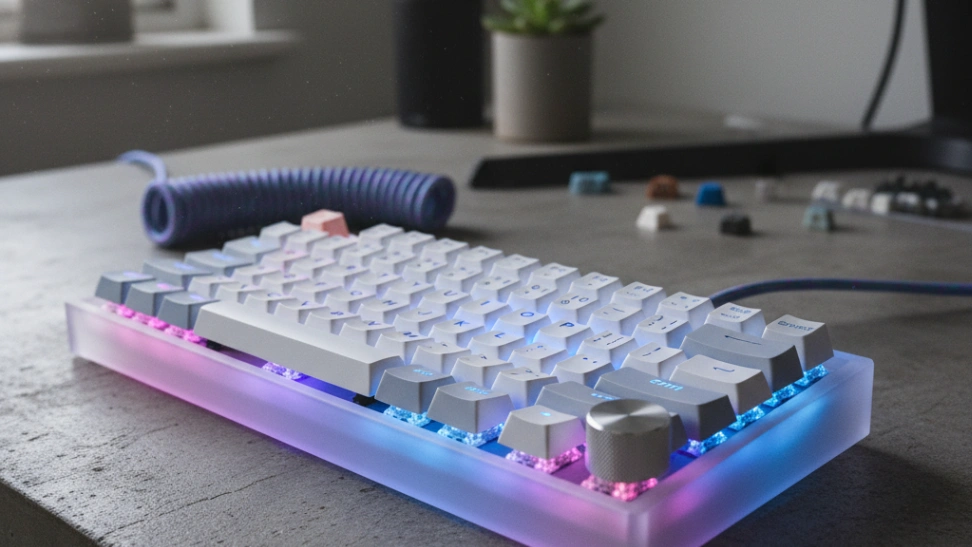
Best Beginner Mechanical Keyboard 2026: Redragon vs GMMK Pro vs Keychron Q1 Pro
Mechanical keyboards are one of the deepest hobbies on the internet: infinitely customizable, surprisingly affordable to start, genuinely improves the typing experience. Hot-swap is the must-have feature. Here are the three boards worth buying as a beginner.
HobbyStack may earn a commission from links on this page at no extra cost to you. Our picks are chosen on merit; the commission helps fund the research.
- Hot-swap is non-negotiable for your first keyboard. Hot-swap sockets let you change switches without soldering — the single most important feature for exploring the hobby.
- Our pick: the Glorious GMMK Pro 75% Barebones (~$170). Premium aluminum chassis, hot-swap PCB, gasket-mounted for soft typing feel. Build your first custom keyboard with your choice of switches and keycaps.
- Budget: the Redragon K617 Fizz 60% (~$27). Pre-built hot-swap with PBT keycaps and real Outemu switches. The lowest barrier to entry that's still a real mechanical keyboard.
- Premium: the Keychron Q1 Max Wireless 75% (~$200). Premium full-aluminum, hot-swap, wireless, VIA configurable. The keyboard you keep for 10+ years.
- Skip: gaming-marketed keyboards with RGB everything and proprietary software (look 'cool', limit customization); keyboards without hot-swap sockets (the whole point is being able to swap switches); keyboards using non-standard layouts that block community keycap sets.
 Our pickGlorious GMMK Pro 75% Mechanical Keyboard (Barebones)Most beginners$50Check price
 Redragon K617 Fizz 60% Mechanical Keyboard (Hot-Swap)Trying it cheap$30Check price
- Keychron Q1 Max Going deep$200Check price
Why mechanical keyboards are a rabbit hole worth exploring
Mechanical keyboards started as a gamer thing and ended up as one of the deepest hobbies on the internet. The reason: they're infinitely customizable, surprisingly affordable to enter, and the typing experience genuinely changes your relationship with your computer.
The hobby has three parts:
1. Switches — the mechanical contact under each keycap. Different switches feel different: tactile (small bump partway through the press), linear (smooth all the way down), clicky (loud audible click). There are hundreds of switches; sampling them is most of the fun. A beginner-friendly switch like Gateron Brown teaches you what tactile feels like. After 6 months you'll have opinions about Holy Pandas vs Boba U4Ts and you won't be able to explain to your spouse why you spent $80 on switches.
2. Keycaps — the plastic tops you actually touch. PBT plastic is more durable than ABS (ABS shines over time from finger oils). Cherry profile is sculpted by row; OEM is the standard. Shine-through legends light up under RGB; non-shine legends look cleaner. A keycap set transforms how the board looks.
3. The board itself — chassis, plate, PCB. Aluminum chassis feels solid and reduces flex. Gasket-mounted boards (where the PCB sits on rubber gaskets, not screwed directly to the chassis) have a softer typing feel.
The single biggest beginner mistake: buying a non-hot-swap board. Without hot-swap, swapping switches requires soldering 100+ joints — possible but tedious, and intimidating enough that most beginners just don't bother. Hot-swap sockets let you pull a switch out by hand and plug a different one in. The whole hobby opens up.
The second-biggest mistake: getting stuck with proprietary software. Gaming-brand keyboards (Razer, Corsair, Logitech G) all use their own software that doesn't work with the broader keyboard community. VIA-compatible boards (most enthusiast brands) use an open-source configurator that works everywhere.
 Best for builders
Glorious GMMK Pro 75% Mechanical Keyboard (Barebones)
The Glorious GMMK Pro 75% is the consensus mid-range hot-swap keyboard for someone wanting to build a custom keyboard without going full DIY. Premium CNC-machined aluminum chassis (feels substantial in hand at ~3 lbs), gasket-mounted PCB for soft typing feel (the upgrade most enthusiasts chase), VIA-configurable, and hot-swap PCB so you can pop switches in and out by hand. Sold as a 'barebones' kit — you choose your switches ($20-50) and keycaps ($25-80) separately, totalling $215-300 for the full build. The 75% layout has all the keys you actually use without the wasted space of a full-size board. The keyboard most enthusiast builders start with and keep for years.
What's good
- CNC aluminum chassis — substantial premium feel
- Gasket-mounted PCB delivers the soft typing feel enthusiasts chase
- VIA-configurable (open-source firmware, not proprietary)
- 75% layout — all useful keys, no wasted space
- Strong community + tons of build guides and tutorials online
What's not
- Sold barebones — must buy switches and keycaps separately ($45-130 more)
- Build experience requires 30-60 min of assembly (rewarding, but real time)
- Heavier (~3 lbs) than plastic-chassis keyboards — not travel-friendly
 Best sub-$40 entry
Redragon K617 Fizz 60% Mechanical Keyboard (Hot-Swap)
The Redragon K617 Fizz is the honest sub-$30 hot-swap mechanical keyboard. Pre-built (not barebones — just plug it in and type), PBT keycaps included (not the cheap ABS that yellows over time), and real Outemu Red linear switches that feel surprisingly decent for the price. Compact 60% layout means no function row or arrow keys — minor inconvenience that builds the muscle memory of using modifier-key combinations (Fn + WASD for arrows). The lowest-friction entry point into the hot-swap world. Use it for 6 months, decide whether to commit to the hobby, sell at $15-20 if you upgrade.
What's good
- Sub-$30 hot-swap working mechanical keyboard — not a toy
- Includes PBT keycaps (durable, won't yellow) and real Outemu switches
- Pre-built — no soldering or assembly required
- 60% layout teaches modifier-key muscle memory (transferable skill)
- Lowest risk to test whether mechanical keyboards click for you
What's not
- 60% layout means no function row, arrows, or nav cluster (Fn-key combos required)
- Build quality is functional, not premium — plastic chassis flexes under pressure
- Limited software customization vs VIA-compatible boards
- Limited resale market — sells for ~$15 used
Keychron Q1 Max
The Keychron Q1 Max is the premium-tier pick — and the keyboard most enthusiast reviewers consider 'the one keyboard to rule them all' for the under-$300 range. Full-aluminum CNC chassis (feels like a brick), gasket-mounted PCB, hot-swap, double-shot PBT keycaps included, VIA-configurable, AND wireless Bluetooth + 2.4GHz wireless + USB-C wired (use however you want). 75% layout. The keyboard you buy and then don't think about again — premium build, fully customizable, works with any setup, lasts 10+ years. Worth $200 if you type for a living or already know you love mechanical keyboards.
What's good
- Full CNC aluminum chassis — premium build quality throughout
- Wireless Bluetooth + 2.4GHz + USB-C wired (use any way you want)
- Double-shot PBT keycaps INCLUDED (don't need to buy separately)
- VIA-configurable + QMK firmware support (deepest customization possible)
- Keychron Q-series has near-universal community love
What's not
- $200 is real money for a first keyboard
- Heavy (~4 lbs) — not portable
- Battery life is solid but not infinite (~100 hours typical, recharge weekly)
Before committing to a full set of switches for your build, buy a 'switch tester' ($15-25 — a tiny board with 6-12 different switches mounted) to feel different switch types under your fingers. Top contenders for testers: Drop Switch Sampler, KeebLand sampler, EpicGear sampler. Trying switches on a tester for 30 minutes will save you from buying 100 switches you end up disliking.
How to choose between the three
Pick the GMMK Pro 75% if you want the most-recommended starter custom build experience. Premium chassis, gasket mount, VIA-configurable, and the largest community of build guides and tutorials. The middle path that most enthusiasts recommend.
Pick the Redragon K617 Fizz if you're testing the waters and don't want to spend $200+ on a hobby that might not stick. Real hot-swap mechanical at sub-$30 — the lowest possible entry point.
Pick the Keychron Q1 Max if you already know you love mechanical keyboards (you've used one at work or a friend's, you've watched 5+ keyboard YouTubers, you can articulate what tactile vs linear means). The keyboard you don't outgrow.
What's the same across all three: hot-swap sockets (the critical feature), real keyboard switches (Outemu/Cherry/Gateron all real brands), proper layout. The differences: chassis quality (Keychron Q1 Max > GMMK Pro > Redragon), customization depth (Keychron Q1 Max = GMMK Pro > Redragon), and price.
Whichever you pick: practice the modifier-key combinations for whatever layout you choose. 60% keyboards take 2-3 weeks to get fast on; 75% takes a few days. The first week of typing slower is the cost of learning a more efficient layout long-term.
Before you buy
Buy a switch tester ($15-25) before committing. Test linear/tactile/clicky on your own fingers before spending $100 on 100 switches you might dislike.
Budget for keycaps separately. A good PBT keycap set (Akko, Drop, Keychron) runs $30-80. Stock keycaps on barebones boards are functional but not the long-term keycap set.
Skip RGB. RGB is fun for a week and irrelevant after that. Plain backlit (white LED) keyboards feel just as good and don't have the visual chaos.
Avoid 'gaming brand' boards (Razer, Corsair, Logitech G). They lock you into proprietary software, often skip hot-swap, and have non-standard layouts that block community keycap sets.
Used Keychron Q1 Maxs sell for $130-160. Worth a search on Mechmarket (Reddit) and Keebmaker — the community is honest about wear and includes original packaging.
Common questions about beginner mechanical keyboards
What does 'hot-swap' actually mean?
What's the difference between switch types — linear, tactile, clicky?
What's a 'gasket-mounted' keyboard and why does it matter?
75% vs TKL vs 60% vs full-size — which layout?
Are 'cheap' switches like Outemu actually usable?
Will lubed switches really make that much difference?
For most people, the Glorious GMMK Pro 75% Mechanical Keyboard (Barebones) is the buy — the best balance of price, quality, and longevity. Want to spend less? The Redragon K617 Fizz 60% Mechanical Keyboard (Hot-Swap) gets you started for a fraction of the cost. Ready to go deeper? The Keychron Q1 Max is the upgrade.
Ready to actually do it?
The first mechanical keyboards quest takes an evening, and it tells you whether the gear was worth it better than any review can.
Start Mechanical KeyboardsThe HobbyStack editorial team researches each guide against manufacturer specifications, published resources and practitioner sources. Every product is checked for availability and described against its current listing before publication, and prices are re-checked when guides are updated.
About our editorial process →More gear guides
All guides
Best Mechanical Keyboard Kit (2026): Finished, Hot-Swap or Barebone
The word "kit" hides a big difference. One of these arrives finished and ready to type on, one arrives as a board with sockets and no switches or keycaps at all, and the gap between them is about eighty pounds of parts you have not bought yet. Working out which one you want is most of the decision.
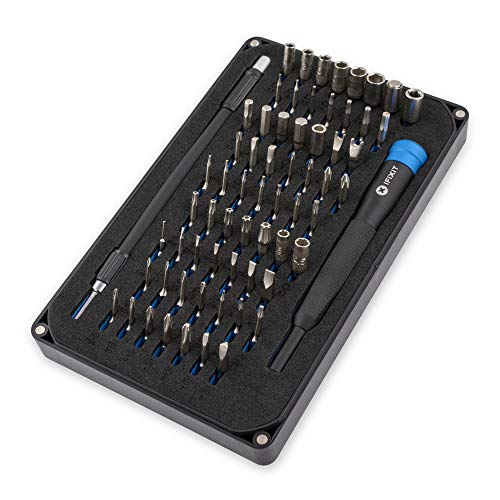
Best Screwdriver Set for Keyboards (2026): Stripped Screws Are the Real Risk
The screws in a keyboard case are small, soft and often threaded into aluminium. A bit that does not fit properly rounds the head on the first turn, and a stripped screw in a closed case is a genuinely difficult problem to solve. That is the whole argument for buying a decent precision set rather than using the driver that came in a drawer.

Best Beginner Fountain Pen (2026): A Japanese Fine Is Not a European Fine
The most common first disappointment with a fountain pen is a line that comes out narrower than expected, and it is not a fault. Japanese nibs are ground finer than European ones at the same letter, so a Pilot Fine is roughly a Lamy Extra Fine. Knowing that before you order decides whether the pen feels right.

Best Fountain Pen Ink (2026): Almost Everything Is Safe, and a Few Things Are Not
The pleasant surprise about fountain pen ink is that a bottle costs less than a decent lunch and lasts a year or more, so this is a hobby where experimenting is genuinely cheap. The unpleasant surprise is that two categories of ink will wreck a pen permanently, and one of them is sold in the same shop aisle.

Best Fountain Pen Paper (2026): Feathering Is a Paper Problem, Not a Pen Problem
A new fountain pen that writes a furry, spreading line on office paper is not faulty. Copier paper is barely sized, so wet ink wicks along the fibres and spreads outward from the stroke. The same pen on properly sized paper lays a crisp line, and nothing about the pen changed.

Best Coin Collecting Books (2026): Learn to Grade Before You Learn Prices
A coin price guide is useless until you can grade. The same 1909 cent might be worth a few dollars or several thousand depending on condition, and every figure in every price book is quoted per grade. Learning to read the prices before you can judge the coin is how people overpay confidently.