Best Digital Caliper for 3D Printing 2026: iGaging vs Neiko vs Mitutoyo
A digital caliper is the measuring tool that turns 3D printing from guesswork into precision: filament diameter, print dimensions, and the tolerances that make parts fit. The good news: every caliper worth buying resolves finely enough for printing, so the real choice isn't accuracy. It's whether the caliper remembers its zero, survives a dusty workshop, and repeats reliably for years. Here's how the picks stack up.
HobbyStack may earn a commission from links on this page at no extra cost to you. Our picks are chosen on merit; the commission helps fund the research.
- For most makers, the iGaging IP54 6-inch (~$38) is the pick — accuracy that rivals calipers five times its price, IP54 dust- and splash-resistance for a messy workshop, and (crucially) Absolute Origin, so it remembers its zero and you never re-calibrate after a battery swap. The sweet spot of accuracy, durability, and price.
- On the tightest budget, the Neiko 6-inch (~$25) is the popular pick — genuinely accurate enough for 3D printing (0.02mm) and perfectly reliable. The one annoyance: no absolute origin, so you re-zero it each session. For a few dollars less than the iGaging, that's what you give up.
- For professional or production work, the Mitutoyo 500-series (~$216) is the gold standard — the trusted ABS Origin encoder, rock-solid repeatability, and the accuracy you pay for when a 0.001-inch error costs money. Overkill for hobby 3D printing; the right call if measuring is your livelihood.
- The decision is Absolute Origin and build, not raw accuracy. All three resolve finely enough for 3D printing; what you buy up the range is a caliper that remembers its zero, shrugs off dust and coolant, and repeats reliably for years. The iGaging gets you most of that for a fraction of the Mitutoyo.
- Skip: a dial or vernier caliper as a beginner (digital is far easier to read accurately); the cheapest no-brand calipers that drift and eat batteries; and the Mitutoyo unless you genuinely need production-grade repeatability — for tuning prints and checking fits you won't see the difference.
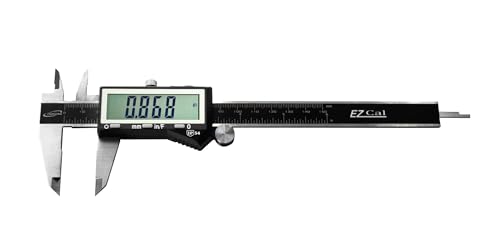 Our pickiGaging 6-Inch IP54 Digital CaliperMost makers$38Check price
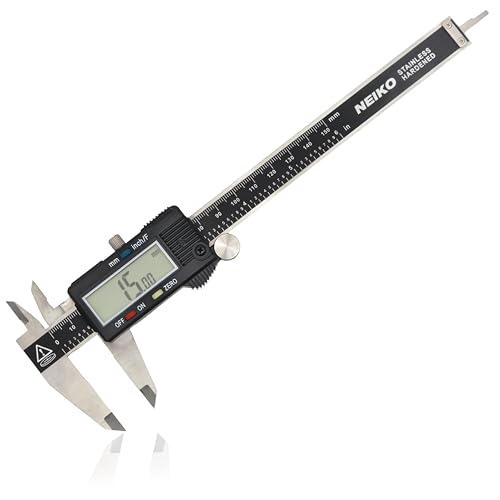 Neiko 6-Inch Digital Vernier CaliperTightest budget$37Check price
 Mitutoyo 500-196-32 Absolute Digital CaliperPro / production$171Check price
They all measure finely enough — so what are you really paying for?
A digital caliper measures distances — outside, inside, and depth — to a hundredth of a millimeter, exactly what you need to dial in filament diameter, check a print's dimensions, and get parts to fit. Here's the thing: every caliper here, from the $25 Neiko to the $216 Mitutoyo, resolves finely enough for 3D printing. So the price gap isn't really about whether it can measure 0.1mm — they all can. It's about three other things:
Absolute Origin — does the caliper remember its zero? Cheap calipers (like the Neiko) lose their reference when you turn them off or swap the battery, so you re-zero them at the start of each session. Better calipers (the iGaging and Mitutoyo) have an absolute encoder that remembers zero indefinitely — turn it on and it's already calibrated. A small thing you'll appreciate every time you pick the tool up.
Build and sealing — a workshop is dusty, 3D printing adds plastic swarf, and machining adds coolant. An IP54 rating (the iGaging) means the caliper shrugs off the dust and splashes that creep into an unsealed tool and throw readings off.
Repeatability over years — the gap between a good hobby caliper and a Mitutoyo isn't the number it shows once; it's whether it shows the same number, reliably, for a decade of daily use. That consistency is what professionals pay for.
For hobby 3D printing, the iGaging hits the sweet spot: pro-level accuracy, IP54 sealing, and Absolute Origin for around $38. The Neiko saves a little and gives up the absolute origin; the Mitutoyo is the production-grade tool you only need if measuring is your job.
 Best for most makers
iGaging 6-Inch IP54 Digital Caliper
The sweet spot of accuracy, durability, and price. The iGaging measures with an accuracy that has impressed even professional calibration labs — close enough to a Mitutoyo that you won't see the difference tuning prints — and it adds the two things that make a caliper a pleasure to live with: an IP54 rating that keeps dust and splashes out of a messy workshop, and Absolute Origin, so it remembers its zero indefinitely and is calibrated the instant you switch it on (no re-zeroing after every battery change). For roughly $13 more than the bare-budget option, you get most of what a $216 Mitutoyo offers. For 3D printing, model-making, and general workshop use, it's the one to buy.
What's good
- Accuracy that rivals calipers five times the price
- Absolute Origin — remembers zero, no re-calibrating
- IP54 sealed against workshop dust and splashes
- The accuracy-per-dollar sweet spot
What's not
- A little pricier than the bare-budget Neiko
- Still not Mitutoyo-grade for production repeatability
- More caliper than a very occasional user needs
 Best on the tightest budget
Neiko 6-Inch Digital Vernier Caliper
Genuinely good, with one small catch. The Neiko is one of the most popular calipers on Amazon for good reason: accurate to 0.02mm, clear to read in metric and inches, and perfectly reliable for 3D printing — checking filament diameter, print dimensions, and fits. For most hobby measuring it does the same job as calipers costing far more. Its one real downside is the lack of absolute origin: turn it off or change the battery and it forgets its zero, so you re-zero it at the start of each session — a few seconds' habit, not a dealbreaker. If you want the cheapest caliper that actually works, this is it.
What's good
- Accurate enough for any 3D-printing measurement (0.02mm)
- The cheapest caliper that's genuinely reliable
- Clear metric/inch digital readout
- Popular and well-proven
What's not
- No absolute origin — re-zero each session and after battery swaps
- Not sealed against dust and splashes
- Battery drain higher than the better units
 The professional standard
Mitutoyo 500-196-32 Absolute Digital Caliper
The gold standard, for when measuring is the job. The Mitutoyo 500-series is the caliper professional machinists trust for production work — the one you reach for when a 0.001-inch error actually costs money. Its renowned ABS (Absolute) Origin encoder remembers zero indefinitely and resists the errors that creep into lesser tools, and its repeatability — showing the *same* reading, reliably, for years of daily use — is what sets it apart from good hobby calipers, far more than the headline accuracy number. It's beautifully made and will outlast everything else on the bench. For hobby 3D printing it's more than you need; for a workshop where precision is income, it's the obvious buy-once tool.
What's good
- The trusted professional/production standard
- Renowned ABS Origin encoder — remembers zero indefinitely
- Exceptional long-term repeatability
- Beautifully built; lasts decades
What's not
- Five-plus times the price of the iGaging
- Overkill for hobby 3D printing
- You won't see the difference tuning prints
A caliper is only as good as its zero. Before measuring, close the jaws fully and confirm it reads exactly 0.00 — if it doesn't, zero it (every caliper here can). With a non-absolute caliper like the Neiko, do this each session and after any battery change, since it forgets. Treat the tool kindly: wipe the jaws and the measuring beam clean first (a speck of plastic or grit throws readings off), don't over-tighten onto the part (consistent, gentle pressure gives consistent numbers), and pull the battery if you're storing it for a while, since cheap calipers can drain a cell even when 'off.' None of this is hard — but skip the zero check and a perfectly good caliper will quietly lie to you.
How to choose between the three
Pick the iGaging if you want the best caliper for the money — pro-level accuracy, IP54 sealing against workshop mess, and Absolute Origin so it's always calibrated. For 3D printing and general making, this is the one to buy.
Pick the Neiko if you want the cheapest caliper that genuinely works. It measures everything you need accurately; you just trade away the absolute origin, so you'll re-zero it each session. A fine choice on a tight budget.
Pick the Mitutoyo if measuring is your livelihood — production or precision machining where repeatability over years and a 0.001-inch tolerance actually matter. It's the professional standard, and overkill for hobby use.
If you're unsure, get the iGaging. It's the rare upgrade that's worth it: a few dollars over the budget option buys the convenience and durability you'll feel every time, without paying for production-grade precision you won't use.
Before you buy
Get digital, not dial or vernier. As a beginner, a digital readout is far faster and harder to misread — and these cost about the same as a decent dial caliper anyway.
Prioritize Absolute Origin if you can. A caliper that remembers its zero (iGaging, Mitutoyo) is a small daily pleasure; one that doesn't (Neiko) means a quick re-zero each session.
6 inches (150mm) is the right size. It covers virtually everything in 3D printing and model work; 8- and 12-inch calipers exist but are rarely needed at home.
Sealing matters in a real workshop. If your bench sees plastic dust, sanding, or coolant, an IP54-rated caliper (iGaging) stays accurate where an unsealed one drifts.
Don't overpay for hobby use. The Mitutoyo is superb, but for tuning prints and checking fits you genuinely won't see what the extra money buys — put it toward filament.
Common questions about digital calipers
What caliper should I get for 3D printing?
Is an expensive caliper worth it?
What is Absolute Origin, and does it matter?
How accurate does a caliper need to be for 3D printing?
Digital, dial, or vernier caliper?
Why is my caliper reading wrong?
For most makers, the iGaging 6-Inch IP54 Digital Caliper is the buy — pro-level accuracy, IP54 sealing, and Absolute Origin so it's always calibrated, for around $38. On the tightest budget, the Neiko 6-Inch Digital Vernier Caliper measures just as finely; you only give up the absolute origin (and re-zero each session). And if measuring is your livelihood, the Mitutoyo 500-196-32 Absolute Digital Caliper is the production-grade gold standard — more than hobby 3D printing needs. They all measure finely enough; pay up for the zero memory and the build, not the number.
Ready to actually do it?
The first 3d printing quest takes an evening, and it tells you whether the gear was worth it better than any review can.
Start 3D PrintingThe HobbyStack editorial team researches each guide against manufacturer specifications, published resources and practitioner sources. Every product is checked for availability and described against its current listing before publication, and prices are re-checked when guides are updated.
About our editorial process →More gear guides
All guides
Best Beginner 3D Printer 2026: Bambu A1 vs Ender 3 V3 SE vs P1S Combo
The 3D printer market changed completely in 2024–2025, auto-calibration is now table stakes and the "buy a kit and learn to fix it" era is over. Here's how to pick a first printer that just works, plus the budget pick that actually deserves your money and the premium pick that beats the K1 Max on reliability.

Best Flush Cutters for 3D Printing (2026): The First Tool You Need
Flush cutters are the tool you reach for after every single print — trimming supports, snipping a stringy blob, cutting filament to a clean point before loading. They are also the tool most often destroyed within a month, because they look like small pliers and people use them to cut wire. One snip through steel puts a permanent notch in the blade, and after that they crush plastic instead of slicing it.

Best Multimeter for Beginners 2026: AstroAI vs Fluke 101 vs Fluke 117
A multimeter is the first diagnostic tool any electronics or robotics hobbyist needs, it tells you what your circuit is actually doing. The good news for beginners: on the low-voltage DC work most hobbies involve, a $35 meter reads the same as a $380 Fluke. The real decision is about voltage and true-RMS, how much power you're measuring, and whether the AC is a clean sine wave. Here's the honest breakdown.
Best Robotics Starter Kit (2026): Build It or Just Code It
Robotics kits split into two philosophies that suit very different people. One gives you loose components and a wiring diagram, so you learn electronics on the way to a working robot. The other gives you a finished robot and asks what you want it to do. Neither is better — but buying the wrong one is the most common way a kit ends up in a cupboard half-built.

Best Laser Engraver for Beginners (2026): Diode to Enclosed
A laser engraver burns designs into wood, leather, acrylic, and slate, and cuts thin materials, all from a design on your computer. For a beginner the two things that matter are power (how thick you can cut) and whether the machine is open-frame or enclosed (safety and mess). Here are three good ones, from an affordable 10W diode to a fully enclosed xTool you can run on the kitchen table.
Best Laser Fume Extraction (2026): Ducting Outside Beats Filtering
Cutting anything with a laser vaporises it, and that vapour has to go somewhere. The honest hierarchy is simple and slightly awkward for a buying guide: sending fumes outside through a duct is better than filtering them, and it is also the cheapest option here. Filters are the answer when you have no window, not the upgrade.