Best Phone Mount for Stop Motion (2026): Any Movement Between Frames Shows
Stop motion is hundreds of still frames played in sequence, and the camera has to be in exactly the same place for every one of them. A mount that shifts by a millimetre between frames produces a jitter you cannot edit out, and it is far more visible than any flaw in the animation itself.
HobbyStack may earn a commission from links on this page at no extra cost to you. Our picks are chosen on merit; the commission helps fund the research.
- Rigidity is the whole specification. A mount that creeps between frames ruins the shot.
- Never touch the phone to take the frame. Use a remote, a timer or a voice trigger.
- Lock exposure and focus before you start, or the image will flicker frame to frame.
- A double-lock clamp resists the slow slip that a spring clamp alone develops.
- Weight the tripod. A light stand plus a heavy phone is a mount that drifts.
 Universal Tripod Clamp AdapterA first try$9Check price
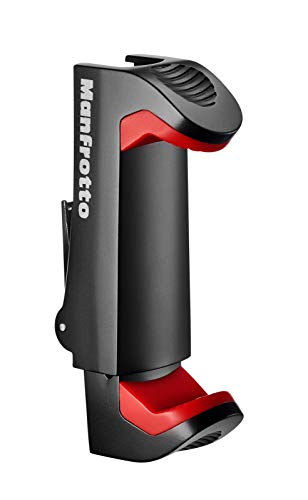 Our pickManfrotto MCPIXI Pro ClampMost animators$25Check price
 Joby GripTight ONE Micro StandA stand in one piece$52Check price
Why rigidity beats everything else
Every other flaw in stop motion is forgivable. Slightly uneven movement reads as style. Fingerprints on the set read as handmade.
A camera that moves does not. The eye is extremely good at detecting a background that shifts when it should be still, and it reads as a fault rather than a choice.
There are three ways it happens.
Slip. A clamp that holds by spring pressure alone can creep under the weight of a phone, especially a heavy one in a case, and especially if the phone is mounted horizontally so gravity works on the joint. A double-lock mechanism — spring plus a positive side lock, which the Manfrotto has — resists this.
Touch. Tapping the screen to take a photo moves the camera every single time. Use the volume button on wired headphones, a Bluetooth remote, a self-timer, or a voice trigger.
Knocks. Someone catching a tripod leg, a table wobbling as you reach across it. Weight the tripod, tape the legs down, and work from one side.
Locking the camera, which matters as much as the mount
A rigid mount and an automatic camera still produce flickering footage, because the phone re-decides exposure and focus for every frame.
Lock exposure and focus. On both iOS and Android, a long press on the subject gives an AE/AF lock. Without it, your hand entering the frame to move a puppet changes the metering, and the brightness jumps between frames — the classic stop motion flicker.
Lock white balance too if your app allows it. Otherwise the colour temperature drifts.
Kill automatic anything else — HDR, night mode, and any auto-enhance, all of which process frames differently.
Control the light. Daylight through a window changes over a shoot, and a cloud passing produces a visible jump. Constant artificial light, away from windows, is far more reliable than better light that moves.
A dedicated stop motion app handles most of this and adds onion skinning — a ghost of the previous frame overlaid on the live view — which is the single most useful feature in the craft.
Mount first, then lock everything.
 Best for a first try
EszkozTA Cell Phone Tripod Mount Adapter
A universal spring clamp with a tripod thread, and at this price it is the right way to find out whether you want to do this at all. It holds a phone on any tripod and works fine for short shoots with a light phone. The limitation is the mechanism: spring pressure alone can creep over a long session, particularly with a heavy phone in a case, and a millimetre of creep between frames is visible.
What's good
- Costs almost nothing to try the hobby with
- Universal fit on any tripod thread
- Fine for short shoots and light phones
- Small enough to keep in a bag
What's not
- Spring pressure alone can creep between frames
- Heavier phones in cases stress it
- No second mounting point for portrait
- Plastic construction flexes under load
 Best for most animators
Manfrotto Universal Smartphone Clamp
The one with a double lock: a spring plus a positive side lock, which is exactly the mechanism that stops the slow creep a spring-only clamp develops over a few hundred frames. It also has two quarter-inch mounting points, so you can rig the phone in landscape or portrait without improvising. Fits phones from 2.36 to 4.09 inches wide. Compact, light and properly made, at a price that is not much above a basic clamp.
What's good
- Double lock resists creep over long shoots
- Two 1/4" mounts for landscape and portrait
- Fits 2.36 to 4.09 inch phone widths
- Well-made and compact for the price
What's not
- Clamp only — you supply the tripod
- Width range excludes the very largest phones in cases
- No ball head of its own
- Three times the basic clamp
 Best all-in-one
JOBY GripTight ONE Micro Stand
A clamp and a mini tripod in one object, which is the case for it: a precision metal folding tripod with gripping feet and a positioning ball head, so you get a complete stable rig rather than a clamp needing a tripod. The stainless spring-loaded grip takes most phones with or without a case. It folds flat. Being small, it sits low, so tabletop sets are its natural home rather than anything needing height.
What's good
- Clamp and metal tripod in one — no separate stand
- Ball head for precise angle setting
- Gripping feet resist sliding on a table
- Folds flat and travels well
What's not
- Low height suits tabletop sets only
- Small footprint is less stable than a full tripod
- Dearest of the three
- Ball head can creep if overtightened phones are heavy
Tapping the screen moves the camera on every single frame, and the accumulated jitter is the most common reason a first stop motion looks wrong. Use the volume button on wired headphones, a cheap Bluetooth remote, the self-timer, or a voice trigger. It costs nothing and it is the difference between footage that sits still and footage that vibrates.
Frame rate, and how much work you are signing up for
The number that decides how long a project takes.
24 frames per second is cinema. Smooth, and it means 24 photographs for one second of film.
12 frames per second, shooting each frame twice — called "on twos" — is what most traditional animation uses. Half the work, and it still reads as smooth. This is the sensible default.
8 to 10 fps gives a deliberately choppy, handmade look that suits a lot of stop motion, and cuts the workload again.
Do the arithmetic before starting: at 12fps, a thirty-second film is 360 photographs. A minute is 720. That is why ambitious first projects go unfinished.
Start with five seconds. Sixty frames, one afternoon, and a finished thing — which teaches far more than an abandoned epic.
Move small. The most common beginner error is moving the puppet too far between frames, which reads as jerky. Smaller movements than feel worthwhile are almost always right, and onion skinning shows you exactly how far you moved.
Before you buy
Double-lock clamps resist the creep that ruins long shoots.
Check the width range fits your phone in its case.
You still need a tripod unless the mount includes one.
Get a Bluetooth remote at the same time. Touching the phone is the main problem.
Lock exposure and focus before the first frame.
Stop motion mount questions
Why does my stop motion footage jitter?
Why does the brightness flicker between frames?
Do I need a special mount, or will any phone clamp do?
How many frames do I need?
The Manfrotto MCPIXI is the buy: its double lock is exactly the mechanism that prevents the slow creep that ruins a long shoot, and two mounting points let you shoot portrait or landscape without improvising. The Joby is worth it if you want the clamp and a stable metal mini tripod as one object for tabletop work. The cheap clamp is fine to find out whether you enjoy this. Then buy a remote, because touching the phone is the real problem.
Ready to actually do it?
The first stop motion animation quest takes an evening, and it tells you whether the gear was worth it better than any review can.
Start Stop Motion AnimationThe HobbyStack editorial team researches each guide against manufacturer specifications, published resources and practitioner sources. Every product is checked for availability and described against its current listing before publication, and prices are re-checked when guides are updated.
About our editorial process →More gear guides
All guides
Best Sculpting Clay for Beginners (2026): Oil vs Air-Dry vs Self-Hardening
The right beginner clay depends on one thing: do you want to practice, or keep the result? Oil clay never dries so it is ideal for learning; hardening clay becomes a permanent piece. Here is what to buy at $13 to $35.

Best Calligraphy Starter Kits for Beginners: Dip Pens, Speedball, and the Pilot Parallel
The right starter kit makes the difference between smooth, satisfying letters and a frustrating mess of ink blots and scratchy strokes. Here are the three kits worth buying first, and why a cheap brush-pen bundle is not one of them.

Best Calligraphy Pen Holders (2026): Straight, Oblique and Why It Matters
The holder is the cheapest part of dip-pen calligraphy and the one that decides whether the script you want is even possible. A straight holder is fine for most hands and most styles. Copperplate and Spencerian, with their steep slant, are very hard to write with one — and that is the whole reason the strange-looking oblique holder exists.
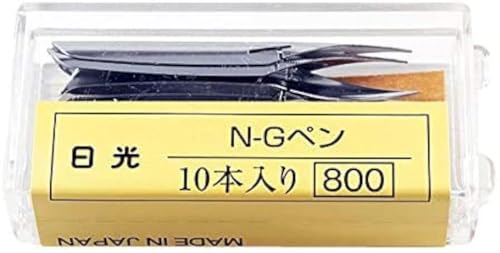
Best Dip Pen Nibs (2026): New Nibs Are Coated and Will Not Take Ink
A brand new nib dipped in ink will often refuse to write, and almost every beginner concludes they have bought a dud. Nibs ship with a thin oil or lacquer coating to stop them rusting in the packet, and ink beads off it. Until you remove that coating, nothing is going to work.

Best Beginner Acrylic Paint Set 2026: Liquitex BASICS and Where to Start
Acrylics are the best paint to start with: fast-drying, water-cleanup, and forgiving, but the cheapest craft-store paints are so thin and chalky they'll put you off. The fix is student-grade acrylics with real pigment, which cost barely more. Here are three sets, from the beginner standard to a pro-quality upgrade.

Best Canvas for Painting (2026): Cotton, Linen, and What Primed Really Means
Almost every cheap canvas says pre-primed, and almost every painter adds more primer anyway. Factory gesso is applied thinly to keep costs down, so paint sinks into the weave, colours dry dull and you use two or three times as much of an expensive tube as you needed to.